How Do You Order a Custom YOUDE Display Rack1?
Ordering a display rack feels complicated. Too many options. Too many specs. You worry about picking the wrong size, the wrong format, the wrong file type. This guide fixes that.
To order a custom YOUDE display rack, you choose your tray size, pick 3 to 6 tiers, set your custom height, and submit your artwork in .AI format2 for graphics and logos. The process stays simple when you follow these four steps.
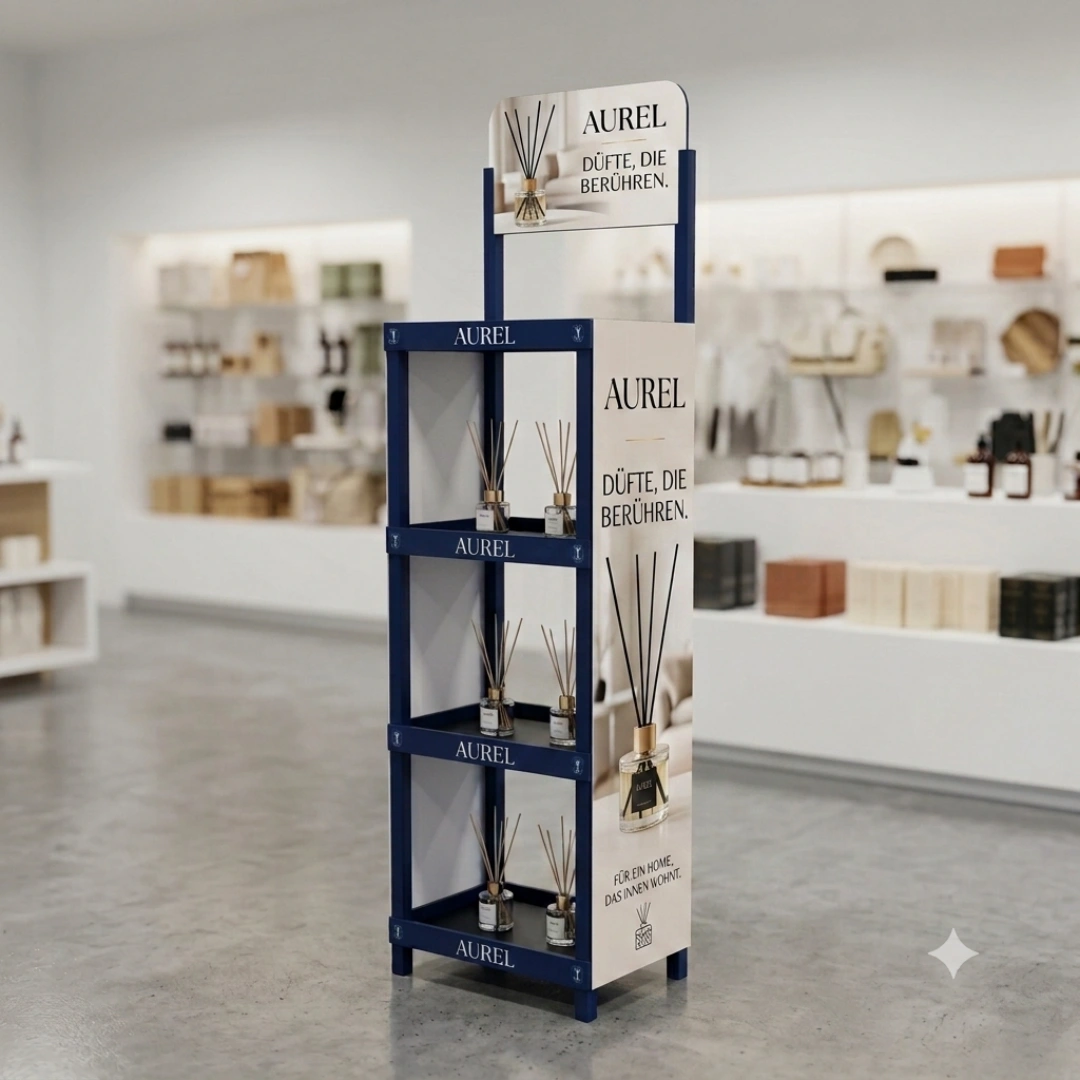
I have worked with buyers across many industries. Electronics, cosmetics, snacks, toys. The question is always the same. How do I order the right rack without wasting time? Below, I break down every part of the process. You will know exactly what to prepare before you contact us.
What Shelf Tray Dimensions and Tier Options Are Available?
You open a catalog and see nine tray sizes. You see tier numbers from 3 to 6. Which combination fits your product? This confuses most buyers at first glance.
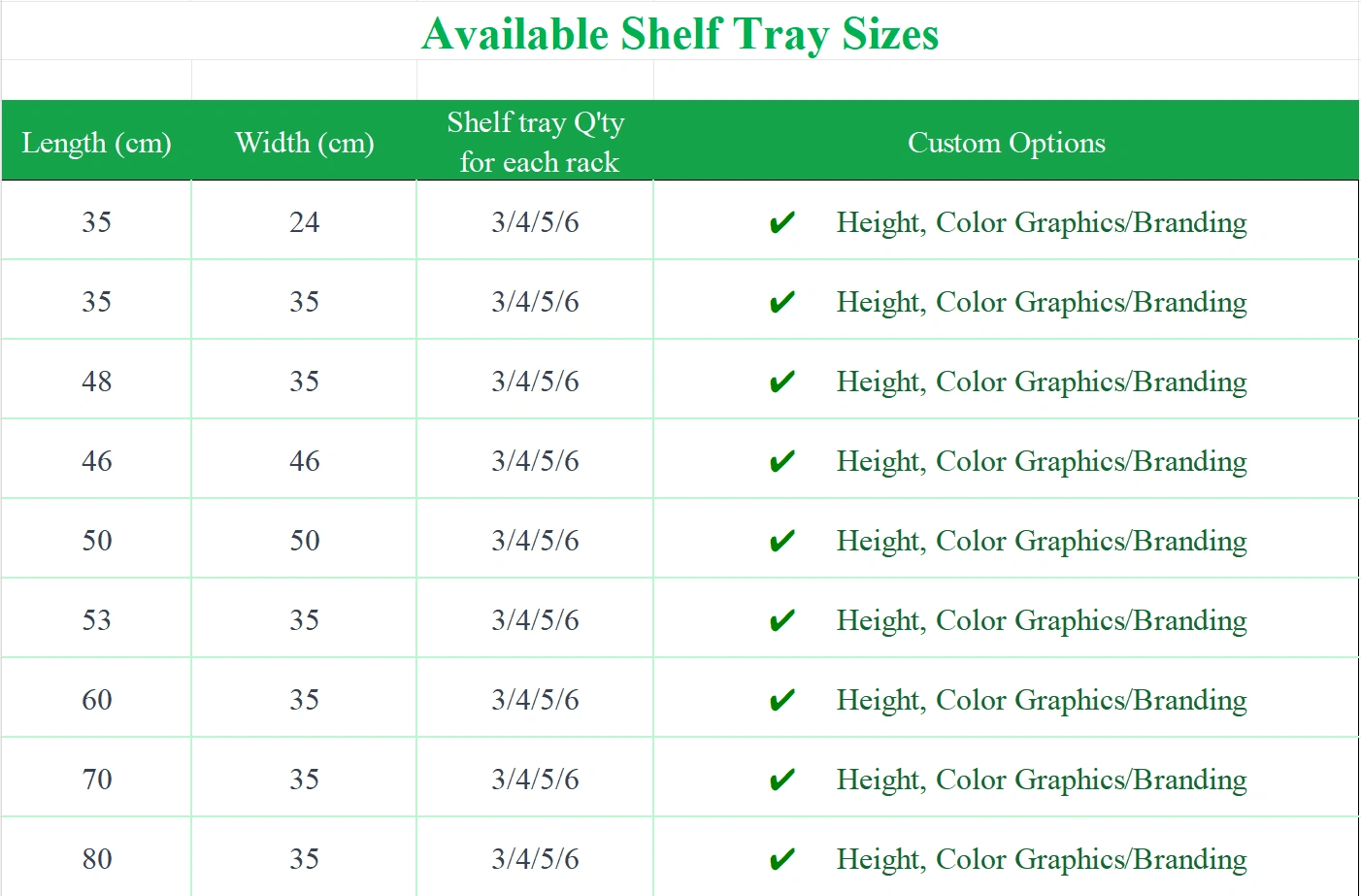
YOUDE offers nine standard tray dimensions, ranging from 35×24cm to 80×35cm. Each tray size supports 3, 4, 5, or 6 tiers3. You can also customize the tier height, as long as the height does not exceed the tray length.
How Do You Pick the Right Tray Size?
Start with your product size. A small item, like a lipstick or a candy bar, fits well on a 35×24cm tray. A larger item, like a bottle of lubricant oil, needs a bigger tray, maybe 60×35cm or 80×35cm.
| Product Type | Suggested Tray Size | Suggested Tiers |
|---|---|---|
| Cosmetics (small) | 35×24cm | 4-5 |
| Snacks & Drinks | 48×35cm or 53×35cm | 4-6 |
| Lubricant Oil | 70×35cm or 80×35cm | 3-4 |
| Toys & Figures | 46×46cm | 3-5 |
| Jewelry & Watches | 35×35cm | 5-6 |
Next, think about tier height. The rule stays simple. Height cannot exceed length. If your tray length is 48cm, your tier height must stay at or below 48cm. This rule protects the structural stability of the whole rack. Once you lock in tray size and tier count, you move to branding.
What Do You Need for Advertising and Graphic Panels?
You have the structure ready. Now you need the branding. But what files do you submit? What formats work? Many buyers get stuck here.
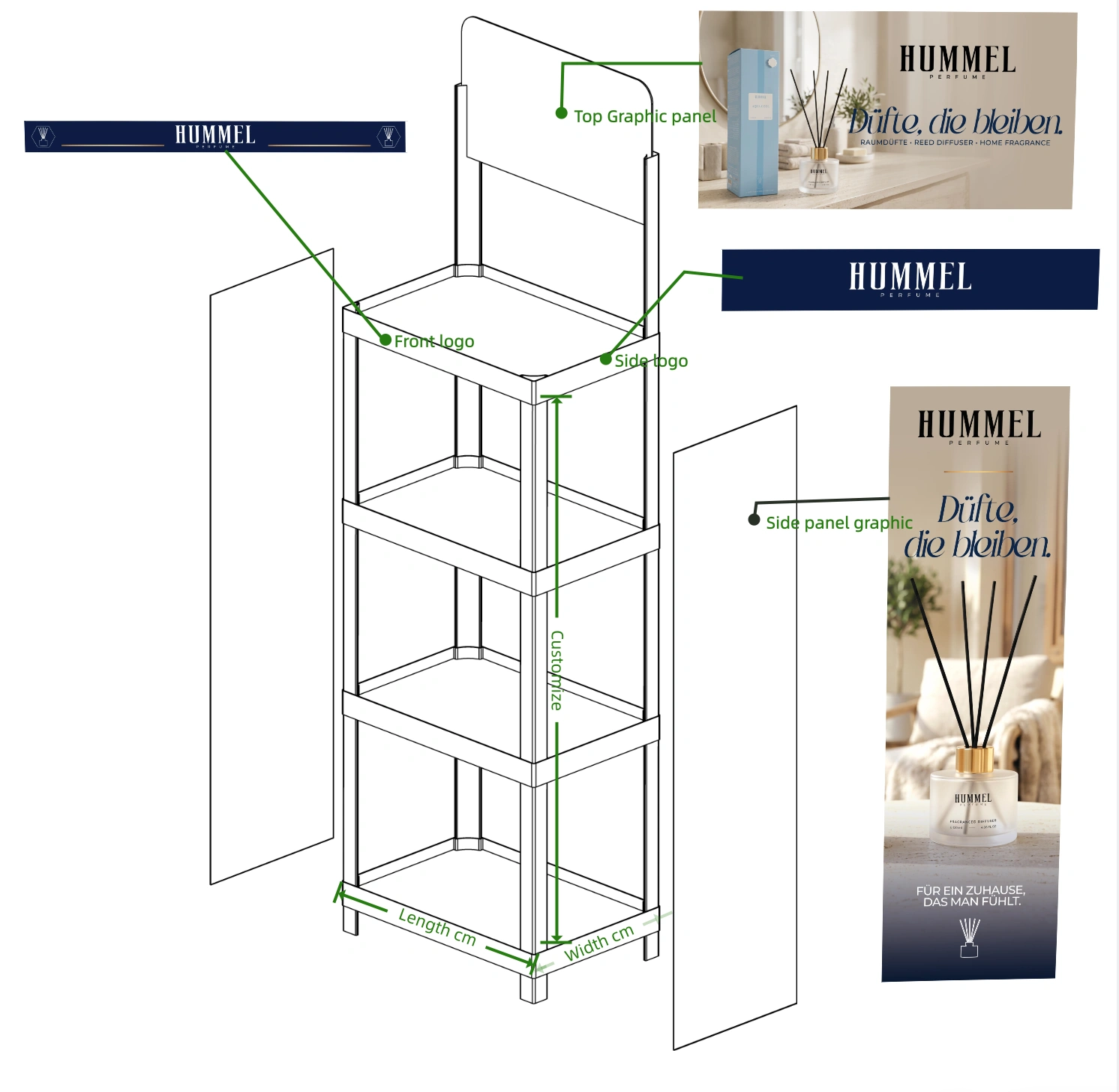
YOUDE requires high-resolution artwork in Adobe Illustrator (.AI) format for all graphic panels. This applies to the Top Graphic Header Panel and the optional Side Graphic Panels. Without the correct file format, production delays happen.
Why Does the File Format Matter So Much?
A .AI file keeps your design sharp at any size. Printers use this format to scale your logo or graphic without losing quality. A low-resolution JPEG or PNG will not work. The print will look blurry. Your brand will look unprofessional on the retail floor.
The Top Graphic Header Panel sits at the top of the rack. This panel grabs attention first4. Shoppers see this before they see your products. This panel carries your biggest branding message.
Side Graphic Panels work differently. These panels are optional. You use them when you want extended visibility from the side aisles. Not every retail layout needs this. If your rack sits in a tight aisle, skip the side panels. If your rack sits in an open floor space, side panels add value5.
Submit both files together if you need both panels. This saves time during production and avoids back-and-forth emails.
How Do You Set Up Custom Logo Placement?
You want your logo on every shelf tray. But where exactly does it go? Front? Sides? Both? This decision affects the final look of your rack.
Custom logos6 can be placed on the Front and/or Sides of each shelf tray. Submit your logo in .AI format. If you choose full-length Side Graphic Panels, we usually skip side logos on individual trays for a cleaner appearance.
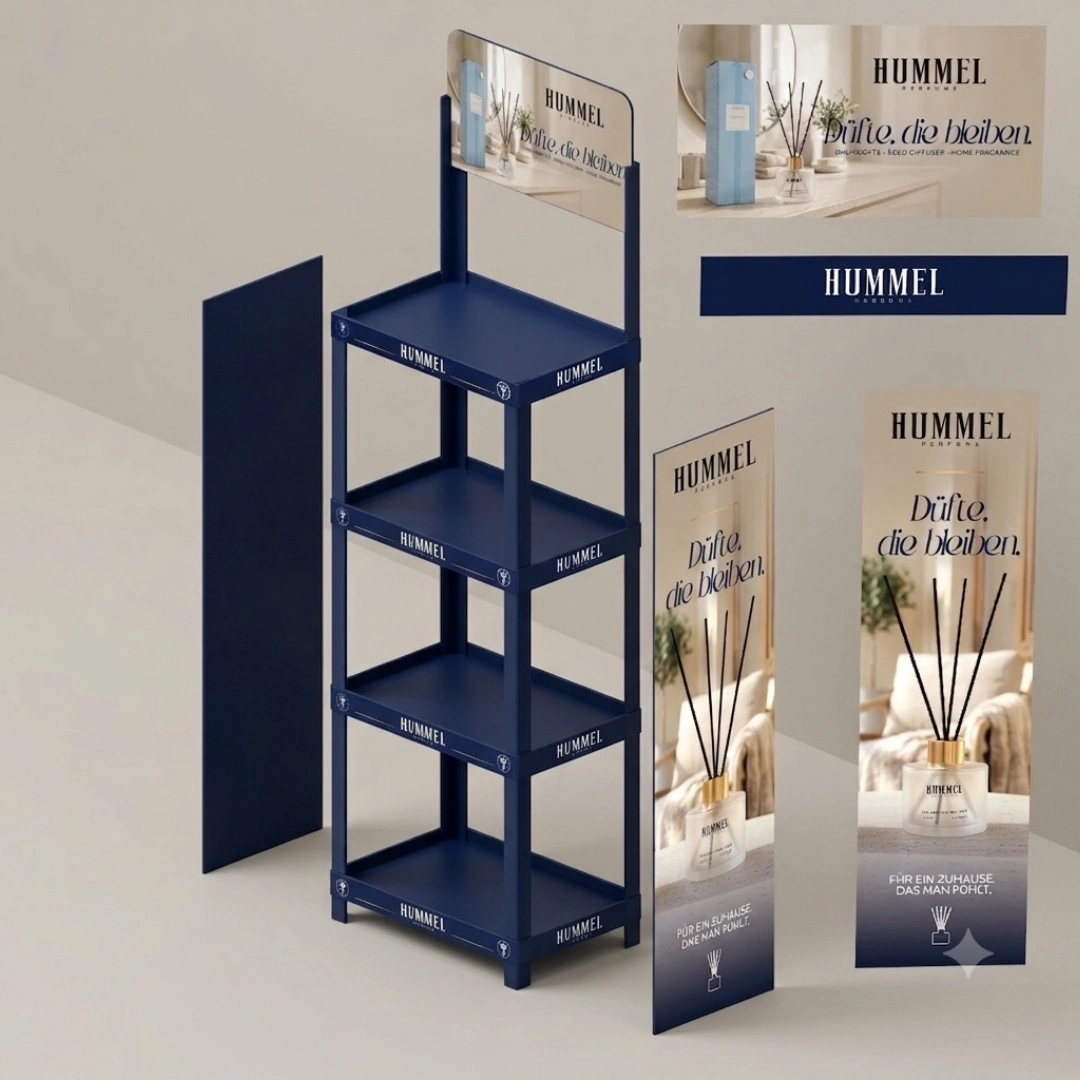
Front Logo vs Side Logo: Which One Should You Choose?
Front logo placement works for almost every rack. Shoppers approach the rack from the front. They see your logo right away. This placement works well for small logos and brand names.
Side logo placement adds extra visibility. This works well when your rack sits in an open area, where shoppers walk around all sides. But side logos repeat on every tray, which can feel repetitive if you also use side graphic panels.
| Logo Placement | Best Use Case | Visual Effect |
|---|---|---|
| Front Only | Standard aisle placement | Clean, focused |
| Front + Side | Open floor display | Maximum visibility |
| Side Panel + No Tray Logo | Full-length branding | Unified, premium look |
My advice stays simple. If you already use full-length side panels, skip the tray-level side logos. This avoids visual clutter. Your rack looks more polished this way.
Conclusion
Ordering a YOUDE display rack takes four steps: pick tray size, set tiers, submit graphics, place your logo correctly.
"Display rack manufacturer - Youde Plastics", https://plasdisplay.com/display-rack-manufacturer/. Official YOUDE product or ordering documentation would substantiate the stated configuration steps for a custom YOUDE display rack, including tray selection, tier options, height customization, and artwork-file requirements. Evidence role: general_support; source type: other. Supports: YOUDE custom display racks can be ordered by choosing a tray size, selecting 3 to 6 tiers, setting a custom height, and submitting graphics or logos in Adobe Illustrator (.AI) format.. Scope note: Brand-specific ordering specifications are unlikely to be verified by neutral third-party sources; neutral sources can only support general display-rack or print-artwork practices. ↩
"Display rack manufacturer - Youde Plastics", https://plasdisplay.com/display-rack-manufacturer/. Manufacturer ordering documentation should substantiate that the custom rack workflow includes tray selection, tier count, custom height specification, and submission of Adobe Illustrator artwork files. Evidence role: general_support; source type: other. Supports: Ordering a custom YOUDE display rack involves choosing tray size, selecting 3 to 6 tiers, setting custom height, and submitting .AI artwork.. Scope note: This would verify YOUDE’s stated process but would be self-reported product documentation rather than independent validation. ↩
"Standard Floor Display Rack for Retail Store - Youde Plastics", https://plasdisplay.com/display/standard-floor-display-rack-for-retail-store/. A product specification sheet should confirm that the standard tray sizes can be configured with 3-, 4-, 5-, or 6-tier arrangements. Evidence role: case_reference; source type: other. Supports: Each YOUDE tray size supports 3, 4, 5, or 6 tiers.. Scope note: This supports availability of stated configurations but does not establish suitability for every product load or merchandising environment. ↩
"(PDF) Behavioral Effects of Digital Signage", https://www.researchgate.net/publication/250168733_Behavioral_Effects_of_Digital_Signage. Research on retail displays and shopper visual attention can support the broader claim that prominent signage or display headers can influence initial attention in store environments. Evidence role: general_support; source type: paper. Supports: A top graphic header panel can attract shopper attention early in the viewing process.. Scope note: The source would likely support attention effects for retail signage generally, not prove that every YOUDE top header is seen before the products. ↩
"Retail C", https://dail.human.cornell.edu/retailc. Retail merchandising literature can support the contextual claim that additional visible display surfaces may improve brand exposure when displays are placed where shoppers can view them from multiple directions. Evidence role: general_support; source type: paper. Supports: Side graphic panels can add merchandising value in open floor spaces by increasing side-angle visibility.. Scope note: This supports the merchandising rationale but does not quantify the commercial value of side panels for a particular store layout or product category. ↩
"visual identity requirements & - brand guidelines", https://www.siue.edu/marketing-and-communications/pdf/siue-brand-guidelines.pdf. A source on custom point-of-purchase display production and vector artwork requirements supports the claim that display-rack components can be branded with logos and that scalable artwork formats are used for print-ready graphics. Evidence role: general_support; source type: institution. Supports: Custom logos can be placed on the Front and/or Sides of each shelf tray. Submit your logo in .AI format. If you choose full-length Side Graphic Panels, we usually skip side logos on individual trays for a cleaner appearance.. Scope note: Neutral sources can support the general practice of logo placement and vector-artwork submission, but they cannot independently verify YOUDE’s specific placement rules unless a YOUDE specification sheet or order guide is cited. ↩